Waze Navigation & Live Traffic
- 4.4
- Rating
- 500.00M
- Installs
- Free
- Price

 Analysis by App-foxy
I noticed the appeal of Waze Navigation & Live Traffic almost immediately: it treats a normal drive as a changing situation rather than a fixed line on a map. Instead of simply telling me where to turn, it keeps the focus on what may affect the journey right now, including traffic conditions, safety alerts, and delays. That makes it feel especially useful during busy commutes, unfamiliar city trips, and any drive where arriving on time matters more than taking the most predictable route.
After the first few journeys, though, the more important question is whether it deserves a permanent place on my phone. My answer is yes, but with a condition: I would not use it blindly for every trip. Its greatest strength is the live driving context created by the Waze community and the way the app can react to changing roads. Its weaker side is that this same focus can make navigation feel busier and less calm than a traditional map app. For drivers who want the quietest possible guidance, another option may be a better daily companion.
What the first week reveals about Waze
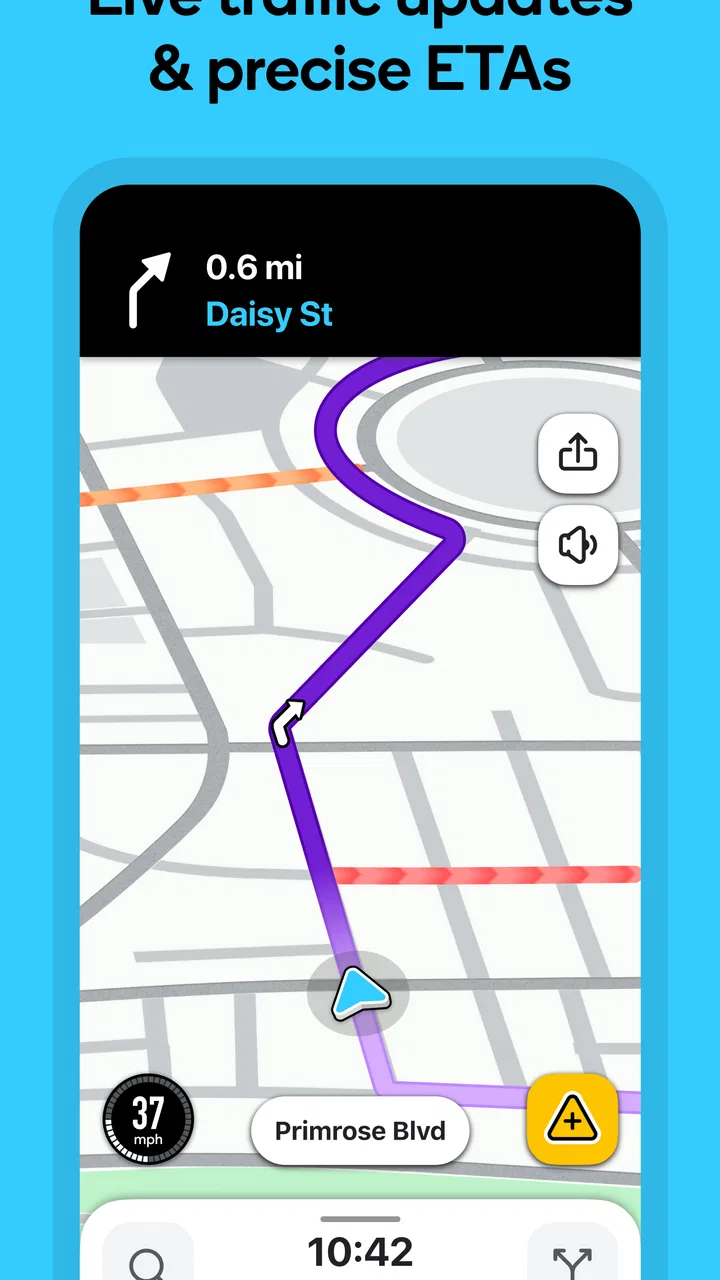
Waze is a free maps and navigation app from Waze, designed around GPS guidance, live traffic information, and alerts that can matter while I am actually on the road. The basic experience is easy to understand: enter a destination, choose a route, and follow the voice and visual instructions. The difference appears when the road does not behave as expected. A slow section, obstruction, hazard, or other reported event can become part of the decision-making instead of something I discover too late.
In-Depth Coverage of Waze Navigation & Live Traffic
That immediacy is what makes the first week enjoyable. I found myself checking the proposed route not only for the turn-by-turn path, but also for the reason behind it. If the app suggested a less familiar street, the live traffic view gave the decision some context. This is more useful than a simple map line when several roads lead to the same area and conditions are changing quickly.
A realistic example is a weekday trip to an appointment across town. I already know the general direction, but a small delay on the usual road could make me late. Waze can make the drive feel more responsive by showing a current route choice rather than relying only on my memory of yesterday's traffic. I still pay attention to road signs and local rules, but the app becomes a second set of eyes for the parts of the journey I cannot see yet.
The first-week experience is also strong for unfamiliar destinations. When I am driving somewhere new, I want clear instructions before a junction, not a map that requires constant interpretation. Voice navigation reduces the need to look down, while the route overview helps me understand the broader trip before moving. That combination is practical when I am already concentrating on lane position, pedestrians, cyclists, and surrounding traffic.
One useful habit is to start the route before leaving rather than waiting until I am already moving. This gives me a moment to check the destination, review the suggested path, and notice whether the journey is likely to involve complicated turns. I also prefer to mount the phone where the screen is visible without blocking my view. Waze is helpful, but it cannot replace safe driving attention.
The app's community-centered design becomes noticeable during this early period. Reports from other drivers can add local context that a conventional map may not emphasize. A driver who regularly uses a familiar road may notice a problem before a general mapping service reflects it. That can be valuable in places where conditions change throughout the day, although the usefulness naturally depends on how active and accurate local reporting is.
Its scale is easy to understand from the store figures: Waze has passed 500 million installs and holds a 4.1 average from around 8.8 million ratings. Those numbers do not guarantee that every route will be perfect, but they do explain why the app feels established rather than experimental. It is a mature navigation tool with a large audience, not merely a novelty built around colorful alerts.
Where the early excitement can mislead
The first week can make every alert feel important. I had to learn not to treat every on-screen event as a reason to change my plan. A report may be useful, outdated, or irrelevant to my lane and direction. The most sensible approach is to let the app inform my judgment rather than turning every notification into an instruction.
Route changes also deserve a little skepticism. A faster estimate is attractive, but the shortest time is not always the easiest or most comfortable drive. A suggested shortcut may involve narrow streets, frequent turns, or roads I would rather avoid at night. Before accepting a major detour, I check the route shape and think about whether the possible time saving is worth the added complexity.
This is one of the app's less obvious trade-offs. Waze is at its best when I want a live response to traffic, but that responsiveness can encourage unnecessary route switching. For a simple trip on a familiar road, I may prefer to keep driving normally instead of constantly evaluating alternatives. The app works better as an informed assistant than as an authority that must be obeyed at every moment.
Why it can remain useful month after month
After the novelty fades, the lasting value comes from repeated situations rather than from exploring the interface. I keep returning to Waze when the same commute changes from day to day, when I need to reach a new address, or when a journey crosses several busy areas. It earns its space by helping with uncertainty, not by making routine driving feel entertaining.
For regular commuters, the practical benefit is the ability to compare today's conditions with the route I would normally choose. I do not need to know every side street in advance. I can leave with a current plan and adjust if the situation develops. That is particularly helpful for people whose working hours vary, because the familiar route at one time of day may be poor at another.
Waze also fits drivers who make many short trips in a large city. A single errand may not justify much planning, but several errands can create a chain of delays. Using live navigation for the less familiar parts of the day can help me avoid entering a difficult area without warning. I find this more valuable when I have a strict arrival time than when I am simply taking a relaxed drive.
You May Also Like

 Hill Climb Racing
Why Hill Climb Racing Still Turns Crashes Into One More Run
A tiny car, a bumpy hill and one more upgrade: Hill Climb Racing keeps resurfacing because its simple chaos makes every near-miss feel personal.

 AliExpress - Shopping App
AliExpress Makes Global Shopping Feel Personal, but Shoppers Bear the Risk
AliExpress turns a global marketplace into a pocket-sized discovery engine. Its reach is useful, its shopping loop compelling, and its trade-offs easy to miss.

 Lords Mobile: Kingdom Wars
Lords Mobile Is a Kingdom-Building Routine, Not a Quick Match
A case-by-case verdict on the building, battles, device demands, and social commitments that make Lords Mobile rewarding for some players and exhausting for others.

 PDF Scanner app - TapScanner
TapScanner Makes Paperwork Easier to Capture, Check, and Share
TapScanner makes scanning with a phone feel less like a rescue operation and more like a dependable step in getting work done. Its capture tools are useful, though not flawless.

 Block Blast!
Block Blast! Shows How Much a Puzzle Game Can Leave Out
A quiet grid game shows why puzzle players increasingly value instant clarity, repeatable skill and low-pressure play—and where the genre still needs to catch up.

 Family Space
Family Space Review: A Shared Routine That Makes Family Life Easier
A parenting app earns its place not by adding more noise, but by making everyday coordination easier. Family Space gets that balance mostly right.
More From Our News Desk
View All News


Another recurring use is checking a journey before departure. Even when I know the destination, I can use the app to decide whether leaving now makes sense or whether I should wait. This is a small workflow, but it changes the app from something I open only after getting into the car into a planning tool I consult before the trip. It also reduces the temptation to make route decisions while already driving.
There is a useful distinction between Waze and a conventional map application. Standard map services are often better for browsing places, examining a neighborhood, saving general locations, and understanding a larger geographic area. Waze feels more focused on the active drive: what is happening on the road, what may slow me down, and what route seems practical at this moment. I would choose based on the task rather than trying to make one app do everything.
For walking, cycling, public transport, or detailed destination research, a broader mapping service may suit me better. Waze is not the app I reach for when I want to explore a shopping area on foot or compare nearby businesses. Its identity is strongest behind the wheel. That focus is a benefit for drivers, but it also limits its usefulness outside the car.
The app is free, which makes it easy to keep installed even if I use it selectively. The content rating is Everyone, and it requires at least Android version 10. That combination makes it accessible to many phone users, although anyone with an older Android device should check compatibility before planning to rely on it. On supported devices, the lack of a purchase barrier makes occasional use practical as well as daily use.
One of my favorite long-term habits is using Waze for the difficult portion of a journey rather than leaving it active for every familiar street. If I know the first half of a trip well, I can still use the app when approaching the congested area or the unfamiliar destination. This keeps the guidance relevant and reduces the amount of visual information competing for my attention.
The maintenance burden is small, but not zero
Waze does not demand much ongoing effort, but good results depend on a few habits. I need to enter the correct destination, confirm that the route makes sense, and keep the phone positioned safely. I also need to remember that live navigation is only as useful as the information available for the road I am using. In a quiet area, there may be fewer timely reports than in a heavily traveled one.
The most important maintenance task is mental rather than technical: I have to keep my own driving priorities in charge. If the app proposes a route that feels unsafe, confusing, or unsuitable for my vehicle, I ignore it. A time estimate is not a promise, and a reported event is not a complete description of the road. Treating navigation as guidance prevents the app from creating more stress than it removes.
There is also a small preparation cost before longer drives. I check the destination spelling, look at the general route, and make sure I will not need to handle the phone once moving. This takes little time, but skipping it can lead to an avoidable mistake, especially when several places have similar names or when the final destination is inside a large complex.
For people who dislike interacting with a phone in the car, Waze may feel like more maintenance than a basic navigation system. The live nature of the app invites attention, and some drivers will prefer a quieter setup with fewer decisions. In that case, a simpler map experience or built-in vehicle navigation may be more comfortable, even if it offers less immediate traffic context.
Where repeated use can become tiring
The same features that make Waze distinctive can become sources of fatigue. Frequent alerts, changing route suggestions, and a visually active map may feel excessive on a short, familiar journey. I do not always need to know about every possible event when I am driving a road I use daily. Over time, I became more selective about when I wanted the full live-navigation experience.
Community reports are another area where judgment matters. They can provide helpful local awareness, but no crowdsourced system is equally reliable on every road. A report may remain visible after conditions improve, while a new problem may not appear immediately. I use reports as clues, then rely on what I can safely observe and on official road signs.
There is a similar issue with alternate routes. Avoiding congestion sounds ideal, but a route that saves time on paper may add stress through complicated intersections or unfamiliar residential streets. In some situations, staying on the main road is the better decision because it is easier to follow and more predictable. Waze gives me choices, but it does not know every personal preference I bring to a drive.
Privacy and attention are also reasonable considerations for anyone choosing a navigation app, although I do not make a decision based only on the presence of live traffic features. I think about whether I am comfortable using a connected, community-informed service while driving and whether its alerts help more than they distract. A driver who wants minimal interaction should test the experience on calm, familiar routes before adopting it for demanding trips.
Another limitation is that Waze is most valuable when conditions are variable. If I mainly drive quiet roads with little congestion, the live advantage may not justify opening the app every time. A standard map with dependable basic directions can be enough for those journeys. The stronger case for Waze appears when timing, traffic, and changing road conditions regularly affect my plans.
Who should keep it installed
I would recommend Waze to city commuters, frequent drivers, people who regularly visit unfamiliar addresses, and anyone whose arrival time is affected by changing traffic. It is particularly appealing if I want navigation that reflects the road as it is now rather than only the road as it appears on a static map. Drivers who enjoy having more context during a trip will probably find the live approach worthwhile.
I would be more cautious about recommending it to someone who wants a quiet, low-interaction navigation experience. It may also be a poor fit for a person who expects every suggested shortcut to be comfortable, perfectly current, and suited to personal driving preferences. Those users may prefer a conventional map application for route planning and a simpler navigation mode for the actual drive.
The app's broad reach is reflected in its roughly 638 thousand written reviews, but popularity should not decide the choice on its own. The better question is whether my driving includes the problems Waze is built to address. If traffic delays and unfamiliar roads are recurring issues, the answer is likely yes. If most trips are predictable and short, its extra information may feel like clutter.
My long-term verdict
Waze Navigation & Live Traffic earns lasting space on my phone because it solves a recurring problem: driving through conditions that can change after I leave home. I value it most before and during busy journeys, where live traffic context and alerts can make a meaningful difference. I do not consider it a universal replacement for every mapping tool, but I do consider it one of the strongest choices for active car navigation.
The app works best when I use it deliberately. I check the destination before moving, glance at the route rather than obsessing over every update, and reject suggestions that do not fit the road or my comfort level. That approach preserves the useful part of the experience without letting alerts and detours take over the drive.
My final recommendation is simple: install it if your routes are unpredictable, your commute is traffic-sensitive, or you often drive to places you do not know. Keep another mapping option available for walking, browsing locations, and broader trip planning. Waze is free, mature, and focused, but its real value appears through repeated practical use rather than constant novelty. It deserves a permanent place when live road awareness genuinely improves your decisions.
For me, that is enough to keep using it month after month. I open it when the journey matters, when the roads may change, or when I want help seeing beyond the next turn. I skip it when the route is obvious and the extra information would only add noise. Used in that balanced way, Waze becomes a dependable driving companion rather than another app demanding attention.
FAQs for Waze Navigation & Live Traffic
01What features does Waze Navigation & Live Traffic offer?
Waze provides real-time navigation and live traffic updates, allowing users to avoid congestion and find the fastest routes. It includes community-reported alerts such as accidents, road closures, and police presence. Additionally, Waze offers voice-guided navigation, integration with music streaming apps, and the ability to plan trips in advance.
02How does Waze's community-based traffic reporting work?
Waze relies on its community of users to share real-time traffic and road condition updates. Drivers can report incidents directly through the app, which are then used to update navigation routes and alert other users. This collaborative approach helps ensure that Waze provides accurate and timely information.
03Is Waze Navigation & Live Traffic free to use?
Yes, Waze is free to download and use on both Android and iOS devices. The app is supported by ads that appear when the vehicle is at a full stop, ensuring they do not distract drivers. There are no premium subscription models, so all features are accessible without cost.
04Can Waze be used offline, and how reliable is it without an internet connection?
Waze requires an internet connection to provide real-time updates and dynamic routing. However, it can store recent routes and maps temporarily. While some basic functionality is available offline, the app’s effectiveness significantly reduces without live data, making an active connection essential for optimal use.
05How does Waze integrate with other apps and services?
Waze seamlessly integrates with various music and podcast apps like Spotify, allowing users to control their audio without switching screens. It can also sync with your calendar to provide reminders for planned trips. Additionally, Waze supports Android Auto and Apple CarPlay, enhancing in-car navigation experiences.
Pros
- Real-time traffic updates ensure accurate routes.
- User-friendly interface simplifies navigation.
- Community-driven alerts enhance road safety.
- Voice-guided directions keep your eyes on the road.
- Customizable settings for a personalized experience.
Cons
- Requires internet for optimal functionality.
- Battery drain can be significant on long trips.
- Ads may be intrusive without a subscription.
- Offline maps are not available.
- Frequent updates may interrupt usage.

Waze Navigation & Live Traffic
Gallery